Comments
Comments are user-provided notes attached to data and detected anomalies. Use them when you can explain an anomaly, confirm it is expected, or add context for later analysis and handoffs (for example root cause, business event, or investigation status).
They give operational context on top of automated detection — so the next person (or a later review) sees not only the signal, but also what was already understood about it.
Web UI
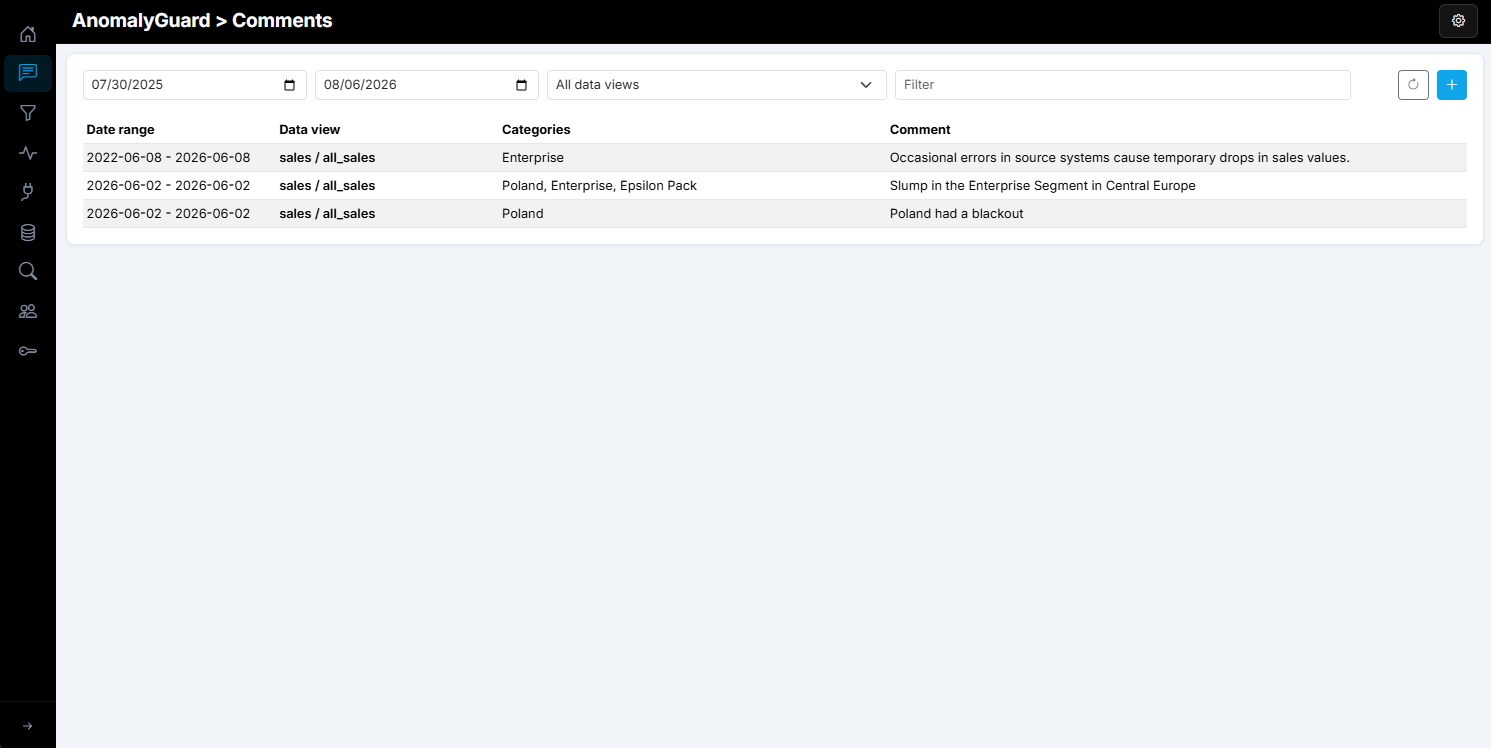
Open Comments in the left navigation (/comments). The page lists comments for the data views you are allowed to see. Filter by date range, data view, and free text; use Add comment (plus) to create one, or click a row to open detail and edit or delete.
You only see comments that belong to data views assigned to your account. The same access rule applies when creating or editing: you can only attach or change comments for those data views. If you have no data views assigned, the Comments section stays empty.
Add a comment
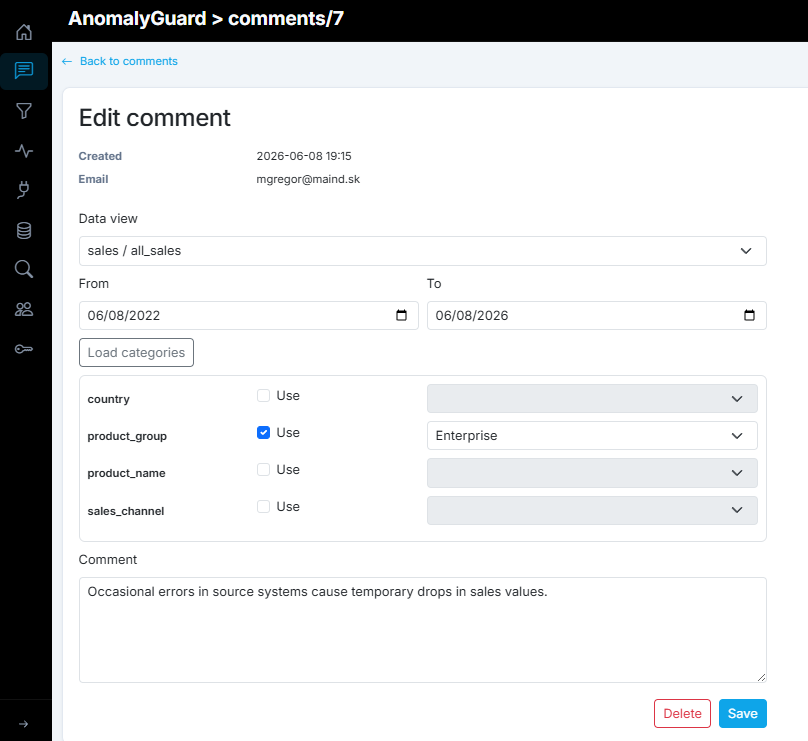
Click Add comment (plus) to open /comments/add. Configure:
| Setting | Purpose |
|---|---|
| Data view | Which data view the note belongs to (only views you can access) |
| From / To | Validity date range — the comment matches anomalies whose dates overlap this window |
| Load categories | Loads category members from the selected data view so you can narrow the scope |
| Comment | Free-text note (required) |
Assign to a category combination
After Load categories, each dimension appears as a row with a Use checkbox and a value dropdown:
- Check Use on the categories that should constrain the comment.
- Pick the member value for each used category (for example
country = SK,channel = Online). -
Leave other categories unchecked — they stay as wildcards (
NULL) and do not restrict matching. -
If you enable no categories (all unchecked), the comment is data-view-wide: it can match any series/anomaly on that data view within the date range.
- If you enable one or more categories, the comment is tied to that combination and matches anomalies that share those category values (other dimensions on the anomaly may still vary when those comment categories are wildcards).
Then click Add comment. Matching comments also show up as indicators on Home / filter results for related anomalies.
REST API
Base path: /api/v1/comments. All results are scoped to data views the caller can access. Auth: Bearer token or X-API-Key (see How to use the API).
| Method | Path | Access | Description |
|---|---|---|---|
| GET | /{id} |
Data user | Get one comment by ID |
| GET | /by-dataview/{dataViewId} |
Data user | All comments for a data view |
| GET | /by-dataview/{dataViewId}/daterange?dateFrom=&dateTo= |
Data user | Comments for a data view in a date window |
| GET | /?dataViewId=&dateFrom=&dateTo= |
Data user | Flexible query — requires dataViewId and/or dateFrom/dateTo |
| GET | /by-email/{email} |
Data user / admin | Comments created by that email (non-admins may only query their own email) |
| POST | / |
Admin | Create |
| PUT | /{id} |
Admin | Update (route id must match body id when set) |
| DELETE | /{id} |
Admin | Delete |
Note
The web UI allows create/update/delete for any signed-in data user on their assigned data views. The REST write endpoints currently require Admin.
Comment body
| Field | Required | Description |
|---|---|---|
text |
Yes | Comment text (max 2000 characters) |
email |
Yes on create via API | Author email (UI fills from the signed-in user) |
dataViewId |
Yes | Target data view |
dateFrom, dateTo |
Yes | Validity window (inclusive dates) |
categories |
No | Map of category name → value; use "NULL" (or omit constraints) for wildcards / data-view-wide notes |
Read examples
GET /api/v1/comments/100
Authorization: Bearer <aad-access-token>
GET /api/v1/comments/by-dataview/5
X-API-Key: <api-key>
GET /api/v1/comments/by-dataview/5/daterange?dateFrom=2026-08-01&dateTo=2026-08-06
X-API-Key: <api-key>
GET /api/v1/comments?dataViewId=5&dateFrom=2026-08-01&dateTo=2026-08-06
X-API-Key: <api-key>
GET /api/v1/comments/by-email/user@contoso.com
Authorization: Bearer <aad-access-token>
Create / update examples
POST /api/v1/comments
Authorization: Bearer <aad-access-token>
Content-Type: application/json

{
  "text": "Expected drop — warehouse maintenance weekend",
  "email": "ops@contoso.com",
  "dataViewId": 5,
  "dateFrom": "2026-08-02",
  "dateTo": "2026-08-03",
  "categories": {
    "country": "SK",
    "channel": "Online",
    "product_group": "NULL"
  }
}
PUT /api/v1/comments/100
Authorization: Bearer <aad-access-token>
Content-Type: application/json

{
  "id": 100,
  "text": "Confirmed — maintenance complete, monitoring next week",
  "email": "ops@contoso.com",
  "dataViewId": 5,
  "dateFrom": "2026-08-02",
  "dateTo": "2026-08-03",
  "categories": {
    "country": "SK",
    "channel": "Online",
    "product_group": "NULL"
  }
}
DELETE /api/v1/comments/100
Authorization: Bearer <aad-access-token>
CLI
Commands map to the endpoints above (see How to use the CLI). Add --json for machine-readable output. Create/update/delete require an admin identity.
Read
anomalyguard comments get 100 --json

anomalyguard comments by-dataview 5 --json

anomalyguard comments query --dataview-id 5 --json

anomalyguard comments query \
  --dataview-id 5 \
  --date-from 2026-08-01 \
  --date-to 2026-08-06 \
  --json
Write
anomalyguard comments create --file comment.json --json

anomalyguard comments update 100 --file comment.json --json

anomalyguard comments delete 100
Example comment.json:
{
  "text": "Expected drop — warehouse maintenance weekend",
  "email": "ops@contoso.com",
  "dataViewId": 5,
  "dateFrom": "2026-08-02",
  "dateTo": "2026-08-03",
  "categories": {
    "country": "SK",
    "channel": "Online",
    "product_group": "NULL"
  }
}