How to use the CLI
The anomalyguard command-line tool maps one invocation to one REST API operation. It is designed for CI/CD, DevOps automation, and AI agents that need stable, scriptable access with machine-readable output.
Download (match app version)
Always use a CLI build that matches your AnomalyGuard application version. The server ships CLI packages for the same release; download them from that deployment instead of mixing versions from another environment or an older install.
anomalyguard --version
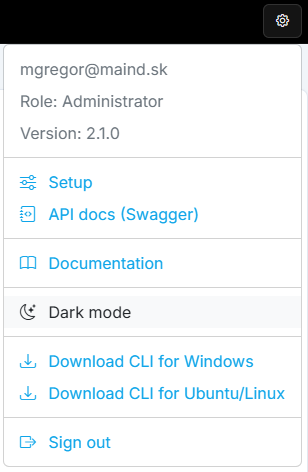
Compare with the version shown in the AnomalyGuard UI (settings menu). If they differ, download the CLI again from that instance.
From the web UI
Open the settings / profile menu and choose:
- Download CLI for Windows —
anomalyguard-win-x64.zip - Download CLI for Ubuntu/Linux —
anomalyguard-linux-x64.tar.gz
From the API
Downloads are public (no auth). List available packages, then fetch the archive for your OS:
GET /api/cli/downloads
Example response fields: platform, fileName, available, downloadUrl, staticUrl.
GET /api/cli/download/windows
GET /api/cli/download/ubuntu
Platform aliases: windows | win | win-x64, and ubuntu | linux | linux-x64.
# Windows (PowerShell)
Invoke-WebRequest -Uri "https://<host>/api/cli/download/windows" -OutFile anomalyguard-win-x64.zip

# Ubuntu / Linux
curl -fsSL -o anomalyguard-linux-x64.tar.gz \
  "https://<host>/api/cli/download/ubuntu"
Optional readiness check:
GET /health/cli-downloads
Returns ready when both Windows and Linux packages are present on the server.
Unpack and run
Windows: extract the zip and run anomalyguard.exe (add the folder to PATH if you want a global command).
Ubuntu/Linux:
tar -xzf anomalyguard-linux-x64.tar.gz
chmod +x anomalyguard
sudo mv anomalyguard /usr/local/bin/   # optional
anomalyguard --version
Overview
- One command equals one API operation under
/api/v1/…. - Ideal for scripting and orchestration.
- Supports machine-readable JSON output via
--json. - Global options:
--base-url,--api-key,--json.
Configuration
anomalyguard config set \
  --base-url https://anomalyguard.contoso.com \
  --tenant-id <your-tenant-id> \
  --client-id <app-client-id>

anomalyguard config show
anomalyguard config path
Configuration is stored in ~/.anomalyguard/config.json.
Environment variables override config file values (recommended for CI):
| Variable | Purpose |
|---|---|
ANOMALYGUARD_BASE_URL |
Server base URL |
ANOMALYGUARD_TENANT_ID |
Entra ID tenant |
ANOMALYGUARD_CLIENT_ID |
App client ID |
ANOMALYGUARD_SCOPE |
OAuth scopes (optional) |
ANOMALYGUARD_API_KEY |
API key for X-API-Key auth |
ANOMALYGUARD_CLIENT_SECRET |
Service principal secret |
ANOMALYGUARD_CLIENT_CREDENTIALS |
Set true to use client credentials flow |
Authentication
Pick one approach:
| Mode | When to use | How |
|---|---|---|
| Interactive login | Local admin / developer | anomalyguard login |
| Device code | No localhost redirect | anomalyguard login --device-code |
| API key | CI/CD, agents, integrations | ANOMALYGUARD_API_KEY or --api-key — see API Keys |
| Client credentials | Service principal automation | Set ANOMALYGUARD_CLIENT_SECRET and ANOMALYGUARD_CLIENT_CREDENTIALS=true |
anomalyguard login
anomalyguard access whoami --json
anomalyguard ping
Entra setup notes: anomalyguard docs.
Command groups
| Command | Description |
|---|---|
ping |
Health check (no auth) |
config |
Read/write CLI config |
login / docs |
Sign-in and setup help |
access |
User data view permissions and status |
filters |
Anomaly filter CRUD |
anomalies |
Query and investigate anomalies |
comments |
Comment management |
connectors |
Database connectors (admin) |
dataviews |
Data view lifecycle and jobs |
system |
License and API keys |
settings |
Application settings (admin) |
api |
Raw HTTP escape hatch |
Run anomalyguard --help or anomalyguard <command> --help for flags. Topic guides: Data Views, Monitoring, Comments, API Keys, How to use the API.
Typical workflows
Check connectivity
export ANOMALYGUARD_BASE_URL="https://anomalyguard.contoso.com"
export ANOMALYGUARD_API_KEY="<your-key>"

anomalyguard ping
anomalyguard access whoami --json
anomalyguard access me-dataviews-status --json
Data view jobs (CI after DWH load)
anomalyguard dataviews jobs-load 5
anomalyguard dataviews status 5 --json
anomalyguard dataviews jobs-process 5
Inspect results
anomalyguard dataviews list --json
anomalyguard anomalies by-filter 12 --json
anomalyguard comments query --dataview-id 5 --json
Admin lifecycle
anomalyguard connectors list --json
anomalyguard dataviews deploy 5
anomalyguard dataviews enable 5
anomalyguard system license --json
anomalyguard system api-keys list --json
Raw API escape hatch
anomalyguard api api/v1/dataviews/lite --method GET --json